

RoundHound is now on iPhone
Our iPhone app is live on the App Store. It’s the same RoundHound as the website, with the same account, jobs, rounds, and feedback, made for the screen you already carry everywhere. The download is free, and so is your first round.
 For iPhone with iOS 16.4 or later. On any other phone, RoundHound works in your browser.
This guide walks through how to practice interviews on your phone with it, one round at a time, using screens from the app.
Why practice interviews on your phone
Most interview advice assumes you’ll sit down at a desk for an hour. Most weeks don’t have that hour. They have twenty minutes between classes, a lunch break, and the wait before a call. A phone turns that time into practice.
- The time you already have
- A couple of short sessions on different days does more than one long one the night before. It’s easier to fit them in when practice is one tap away.
- Close to the real call
- First interviews are often phone calls. Answering into your phone, with no notes on a second screen, is close to how the recruiter screen will feel.
- Nothing to set up
- No laptop, no tabs, no headset to find. Open the app, pick the round, and start.
Start from the job link, not a question list
Paste the link to the job you applied for. RoundHound looks up how that company interviews for that role and lays out the rounds you’re likely to face, in order, with how long each one is and what it tests. If the company is one we’ve already researched, you can pick the job from the list instead.
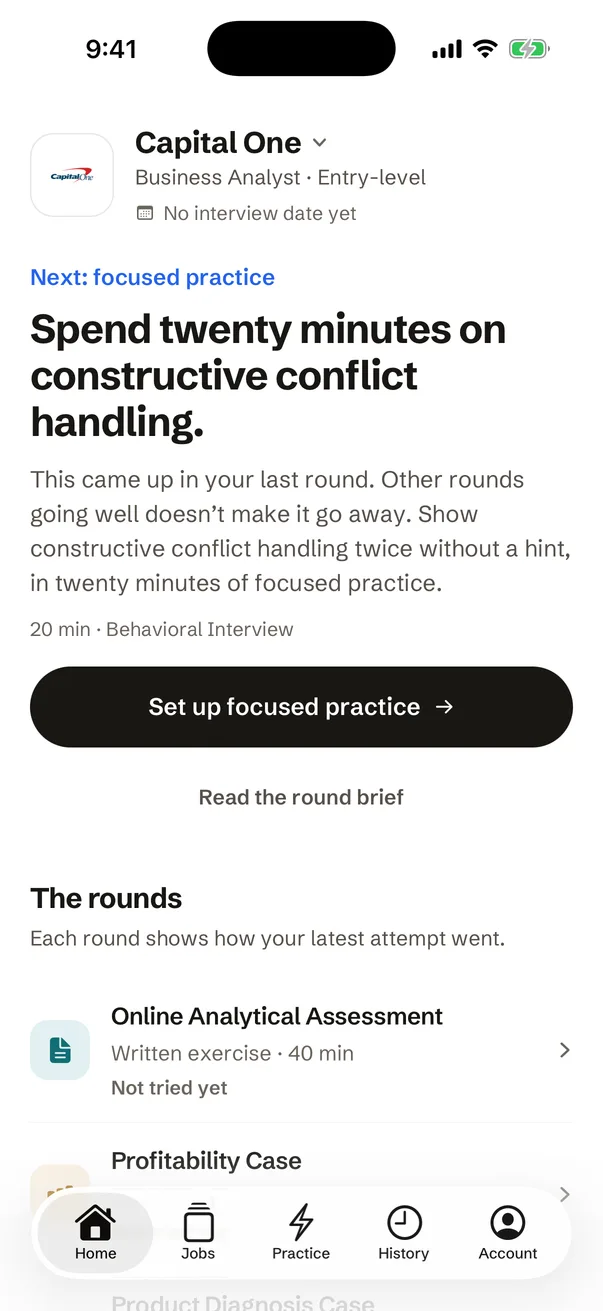
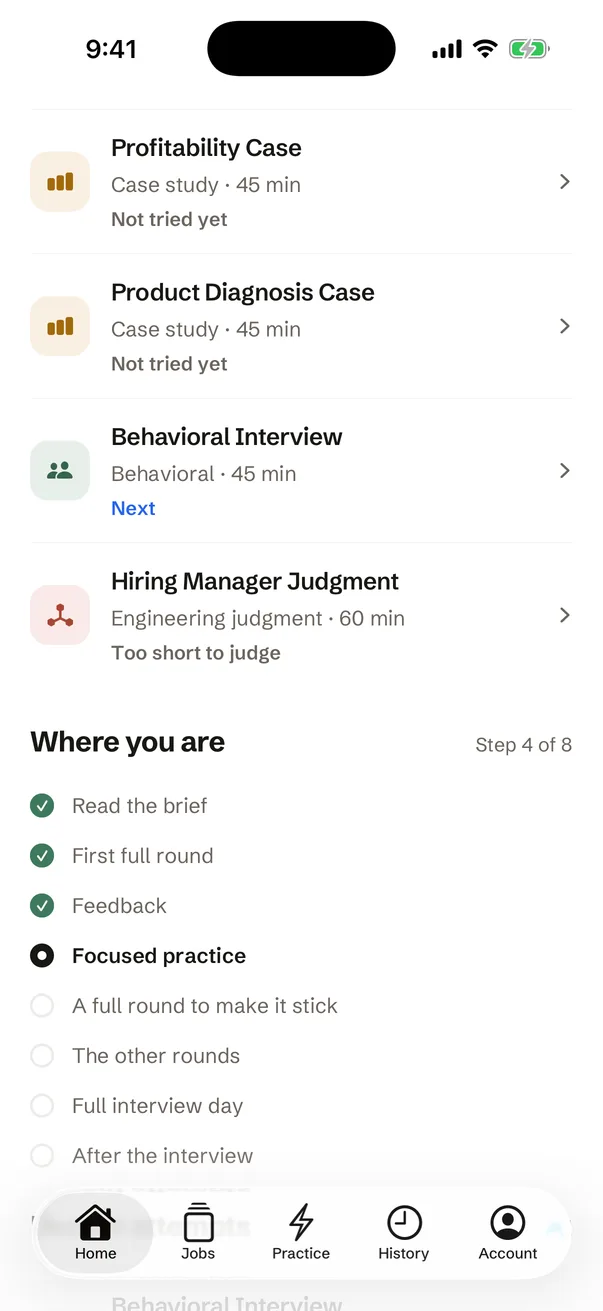
You don’t have to practice every round. Start with the one your interview leans on most. For most roles, that’s the behavioral round.
Run a full round, by voice or by typing
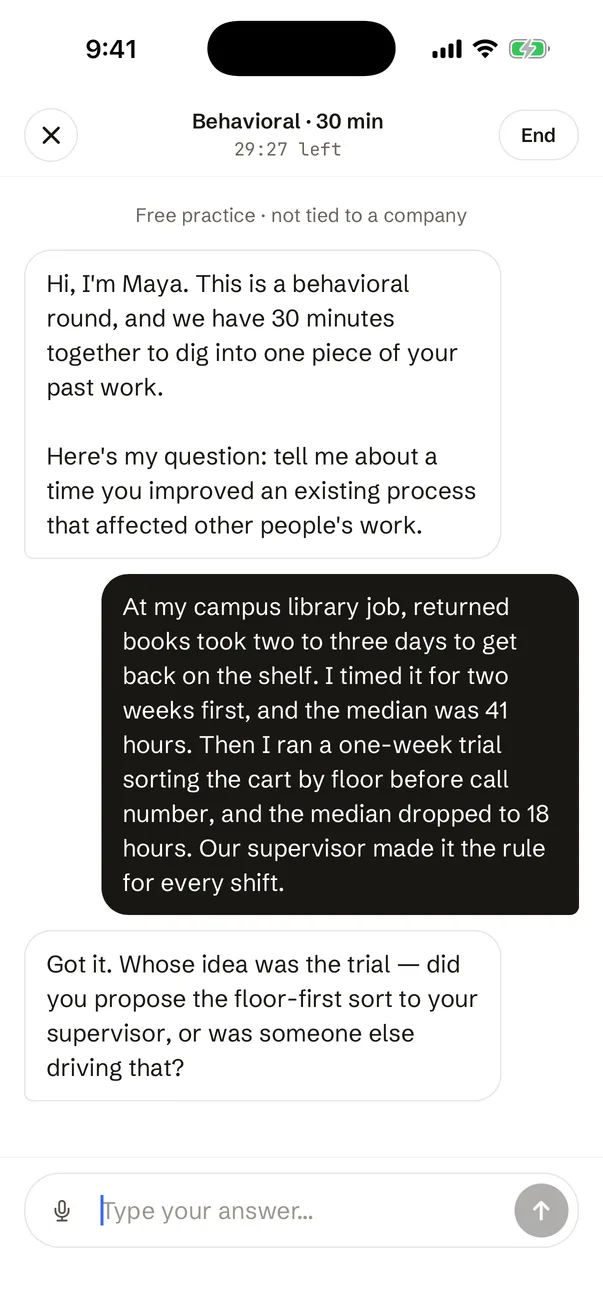
Start a round and an AI interviewer runs it at full length. Hold the microphone to answer, or type when you can’t talk, like on a bus or in a library. You can switch between the two at any point in the same round.
The interviewer listens to what you actually said and follows up on it, the way a real one would. If your answer skips over your own part, you’ll hear about it.
“Got it. Whose idea was the trial? Did you propose the floor-first sort to your supervisor, or was someone else driving that?”
A tip for voice: earphones with a microphone help in busy places, and a quiet corner helps more. If neither is around, type the round and use your voice for the next one.
Coding and system design rounds, without a keyboard
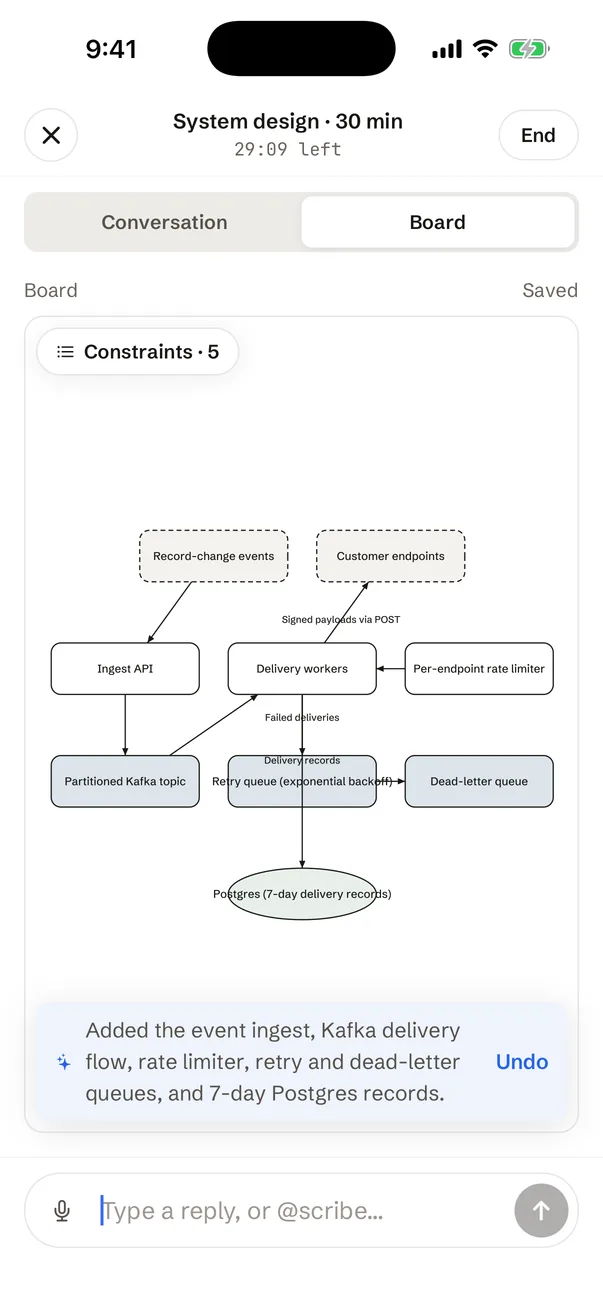
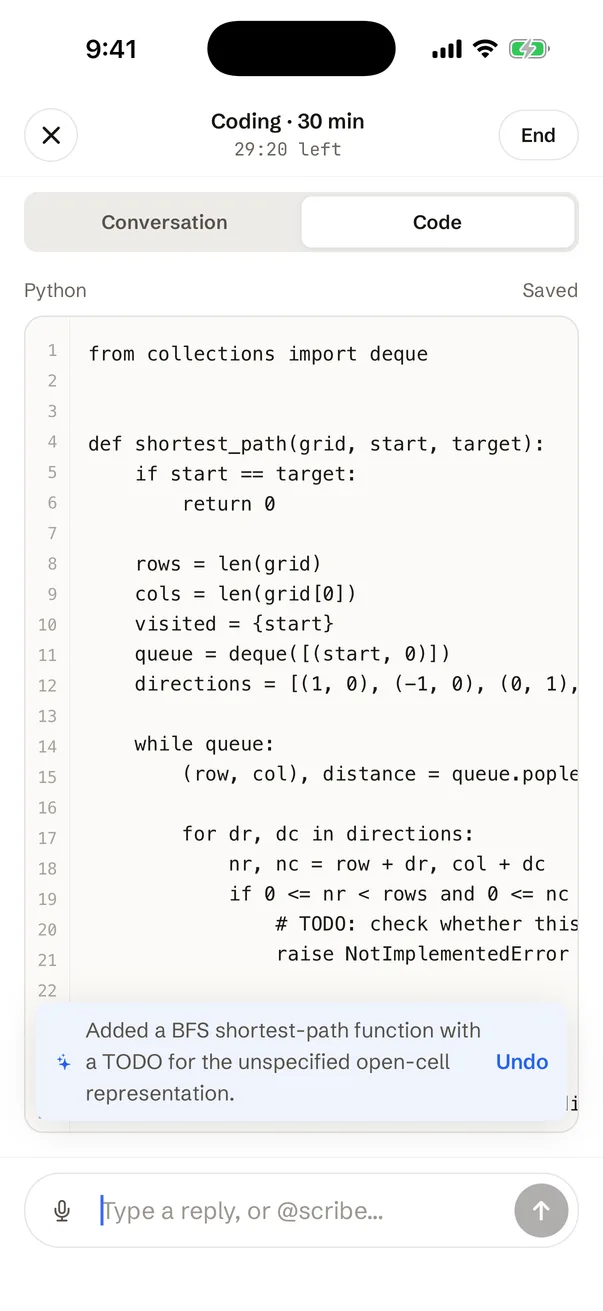
Writing code with your thumbs is nobody’s idea of practice, so the app doesn’t ask you to. In coding and system design rounds, a scribe does the typing and drawing. Hold the microphone and describe what you want, or type a message that starts with @scribe. It writes the code or draws the board, and you can undo any change.
The scribe writes down your approach, never the answer. Ask it to solve the problem and it will decline. The interviewer sees the same code or board you do and asks about your choices, which is the part of a technical round that decides it anyway.
Portfolio reviews and presentations
Some rounds are about your own work: a design portfolio, a writing sample, a case you present. Attach a PDF or an image when you set up the round, and it stays open in the room while you walk the interviewer through it. You can practice the presentation on the train and still get questions about slide four.
Read your feedback wherever you are
Every round ends with feedback built from your own words. It says plainly whether the round went well or names the one thing to work on next, and shows what interviewers listen for in that kind of answer. Then it rebuilds your answer in the order they listen for, marking the parts that were still missing.
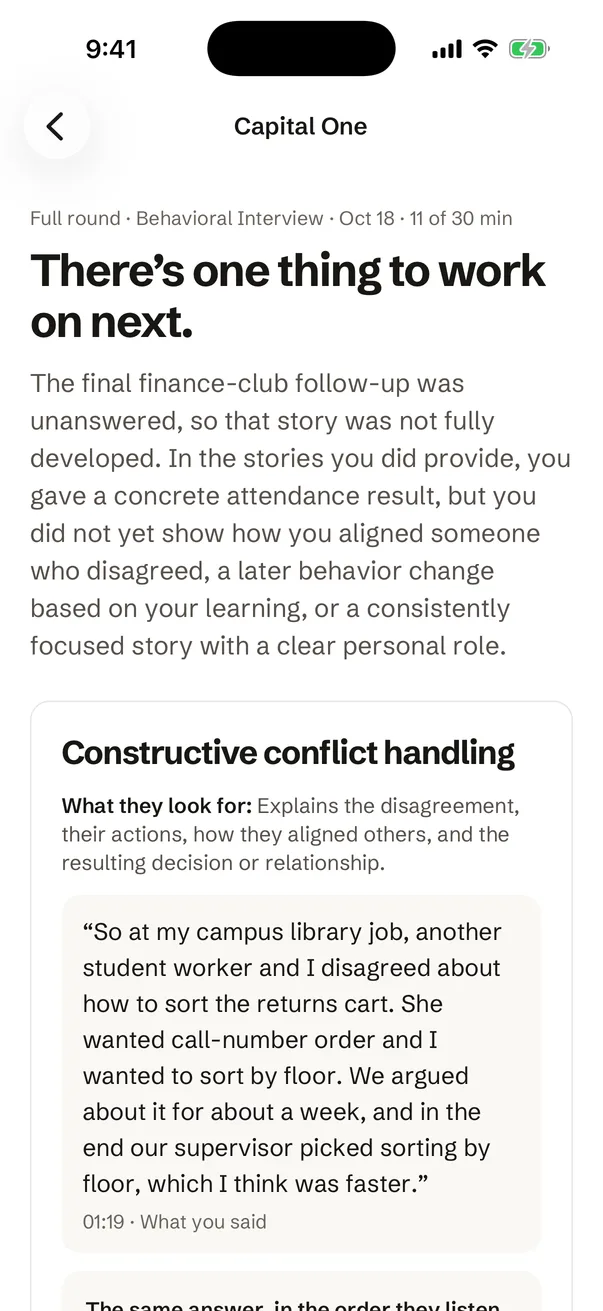
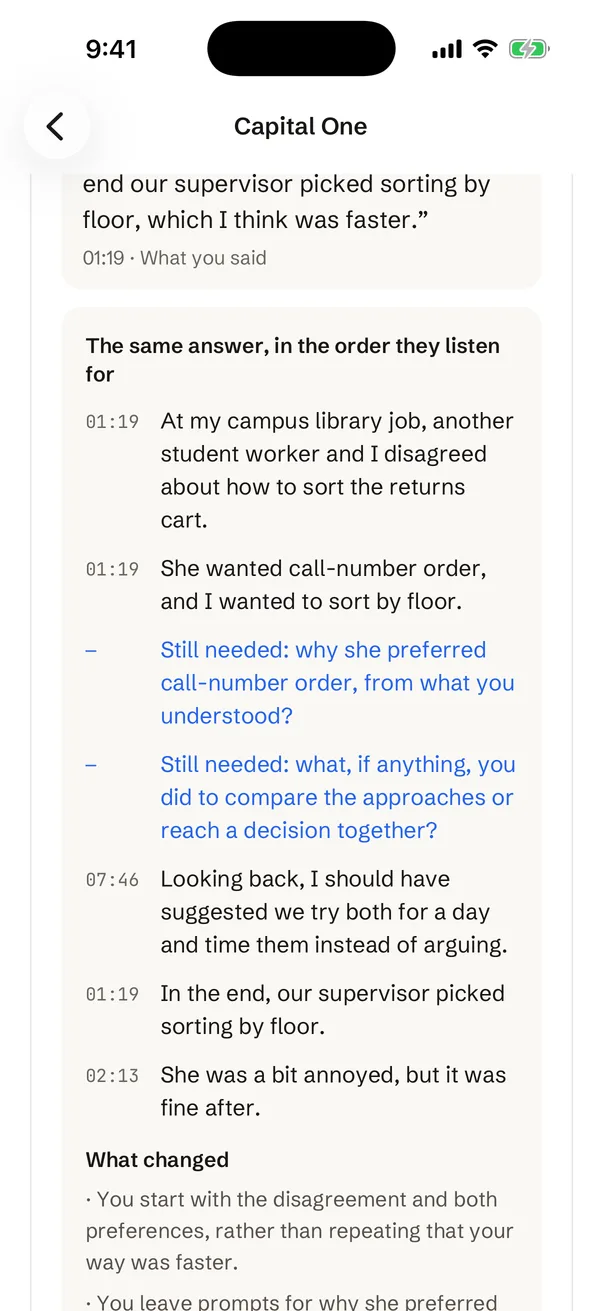
Feedback is easy to read on the way home, while the round is still fresh. When you’re ready, the app suggests what comes next: a short focused practice on that one skill, or another full round.
A week of practice on your phone
If your interview is about a week away, here’s a simple way to fit it around everything else.
Paste the job link
Read the rounds and what each one tests. It takes a few minutes and tells you where to spend the rest of the week.
Run the round that matters most
Do it in one sitting, at full length, somewhere you can talk. Read the feedback that evening.
Work on the one thing
Do the focused practice the app suggests, then run the full round again to see if the fix holds.
Reread, don’t cram
Look back over your feedback and rebuilt answers. A fresh, rested answer beats one more late-night round.
For the parts of preparation that happen away from practice, like researching the company and planning your questions, see how to prepare for an interview.
What it costs
The app is free to download. The free Starter covers up to 10 jobs and your first round, 20 minutes with full feedback, and needs no card. If you want more, a Sprint pass covers 7 days for $15 and a Pro pass covers 30 days for $30, paid once, with no subscription. Passes are bought on roundhound.ai and work in the app and on the web. See all the details on the pricing section, and if you’re weighing free options, read how to make your free round count.
Common questions about practicing interviews on your phone
Is there an Android app?
Not yet. On Android, or any phone, RoundHound works in your browser with the same account.
Do I need an account to try it?
You can look around and set up a job without one. To start the company research or a practice round, sign in with Apple, Google, or your email.
Can I start on my laptop and continue on my phone?
Yes. Your jobs, rounds, and feedback are the same on the web and in the app, so you can run a round on your laptop and read the feedback on your phone later.
Can I practice without talking?
Yes. Every round can be typed from start to finish, and you can switch to voice whenever you’re somewhere you can talk.
What kinds of rounds can I practice?
Behavioral, coding, system design, case studies, role-plays, portfolio reviews, presentations, written exercises, and more, depending on what the company runs for that role. Not sure what to expect? Start with our mock interview questions by round.
Get the app
Download RoundHound on the App Store, paste the link to your job, and run your first round on the way to wherever you’re going. You can also read more about the app on RoundHound for iPhone.
Free download · first round free